
The Violation scoring and risk profiling feature allows organisations to calculate and track case-related risk scores for personages and managers.
The scoring logic is configured at the organisation level. Depending on the configuration, scores can take into account the violation sub-category, position grade severity, and other case-related factors.
What the feature includes
The feature supports:
configurable scoring settings;
scoring based on case sub-categories;
scoring based on position grade severity;
automated score updates through the
set_scoreaction;cumulative violation scores for personages;
aggregated average scores for managers;
risk profile events for visibility and automation.
Before you begin
Before scores can be calculated, your organisation must configure:
the score calculation method;
score values for relevant violation sub-categories;
position grade severity values;
any automation rules that use the
set_scoreaction;permissions for users who can view scoring information.
The exact calculation logic depends on your organisation’s configuration.
How personage scoring works
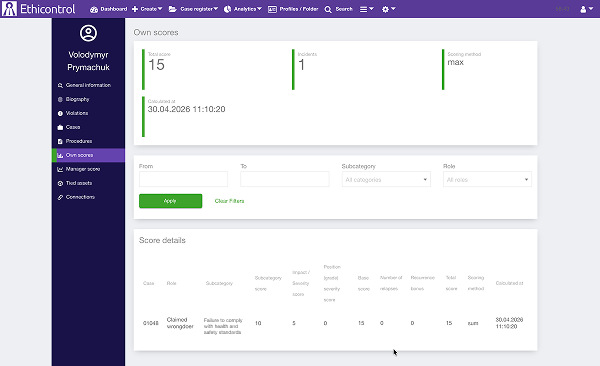
Each personage can have a cumulative violation score.
When a score is assigned to a personage, it is added to their existing score history.
This makes it possible to track the accumulated score across multiple cases and identify repeated or increasing risk patterns.
The score can be based on factors such as:
the selected violation sub-category;
the severity assigned to the personage’s position grade;
values defined in the organisation’s scoring settings;
an automated
set_scoreaction.
The cumulative result is displayed in the personage’s Profile / Dossier.
How manager scoring works
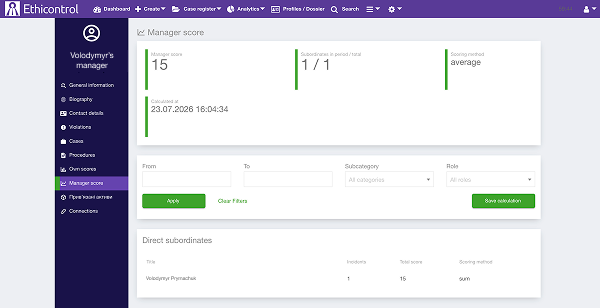 Managers receive an aggregated score based on the scores of their subordinates.
Unlike personage scoring, which is cumulative, manager scoring uses an average calculation.
This provides an overview of the risk level across the manager’s team.
The manager score can help authorised users review:
the average score of direct subordinates;
changes in team risk over time;
which violations contribute to the result;
patterns across a department or reporting line.
The result is displayed in the manager’s Profile / Dossier.
Position grade severity
A position grade can be assigned a severity level.
This allows the scoring engine to account for the level of responsibility or exposure associated with a person’s role.
| Severity level | Score |
| No impact | 0 |
| Medium | 1 |
| High | 5 |
| Critical | 15 |
For example, a violation involving a role with a higher severity level may receive a different score from the same violation involving a role with a lower severity level.
The available severity levels and their impact on the score are defined in the organisation’s scoring settings.
Violation sub-category scoring
Score values can be assigned to violation sub-categories.
This allows different types of violations to contribute different values to the final score.
For example, an organisation may assign:
a lower score to a minor procedural violation;
a higher score to fraud, violence, data misuse, or another serious violation.
The actual values are configured by the organisation.
How automated scoring works
The scoring engine calculates a personage’s score by combining several case-related values.
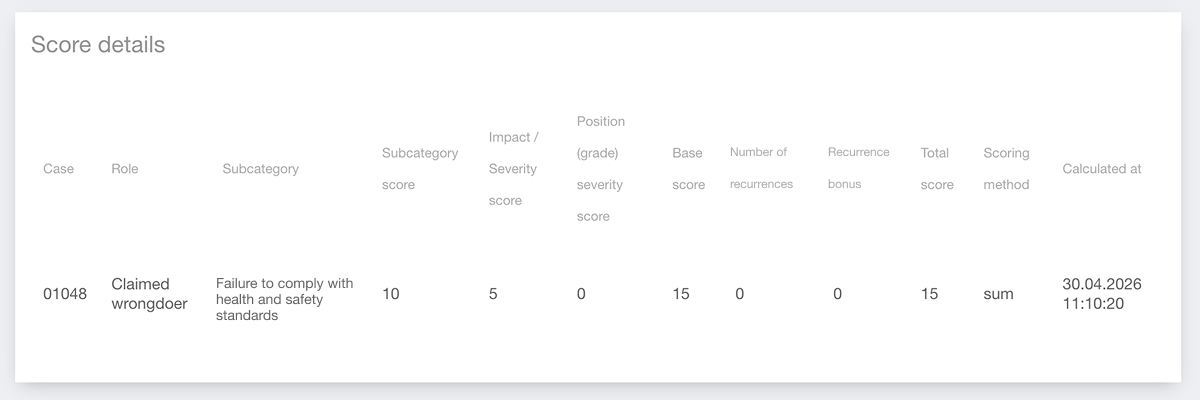
The score details include:
- Subcategory score — the score assigned to the selected violation sub-category;
- Impact / Severity score — the score assigned to the incident impact or severity;
- Position (grade) severity score — the score assigned to the personage’s position grade;
- Base score — the combined initial score before recurrence adjustments;
- Number of recurrences — how many previous relevant violations are counted;
- Recurrence bonus — additional points added for repeated violations;
- Total score — the final result after all configured values are applied;
- Scoring method — the calculation method used, such as sum;
- Calculated at — the date and time when the score was calculated.
In the example shown, the score is calculated as follows:
10 Subcategory score + 5 Impact / Severity score + 0 Position severity score = 15 Base score
Since there are no previous recurrences, the recurrence bonus is 0, so the final Total score remains 15.
The exact values and calculation logic depend on your organisation’s configured scoring settings.
Risk profile events
New risk profile events can be used in automations and workflows.
These events allow the system to react to score-related changes, for example when:
a score is assigned;
a score is recalculated;
a personage reaches a configured value;
a manager’s aggregated score changes.
Depending on the workflow, these events can support notifications, follow-up tasks, reviews, or other configured actions.
Viewing a personage’s score
To review a personage’s scoring information:
Open Profiles / Dossier.
Find and open the required personage.
Go to the section containing their violation or risk scores.
Review the cumulative score and available score details.
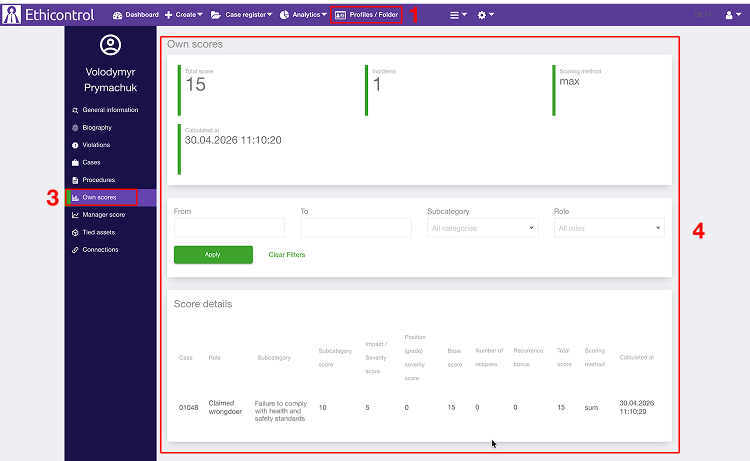
Depending on the interface and permissions, the score details may include:
the related case;
the personage’s role in the case;
the violation sub-category;
the sub-category score;
the position grade severity;
the final score;
the calculation date.
Viewing a manager’s score
To review a manager’s aggregated score:
Open Profiles / Dossier.
Find and open the required manager.
Go to the manager scoring section.
Review the aggregated average score and subordinate details.
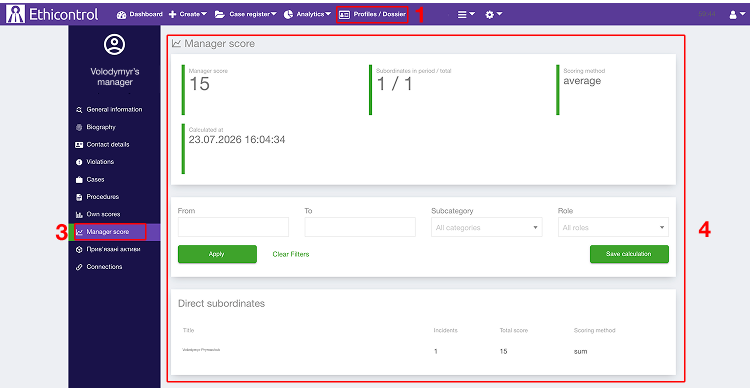
Filters may be available for:
date range;
violation sub-category;
case role.
What happens when a score is updated
After a score is assigned or recalculated:
the personage’s cumulative score is updated;
the relevant score details are added to their profile;
a manager’s average score may also change;
configured risk profile events may be triggered;
the change can be used by other automations.
The update does not remove previous score records unless this is explicitly defined by the organisation’s configuration.
Troubleshooting
A personage’s score was not updated
Check that:
scoring is enabled for the organisation;
the personage is correctly linked to the case;
the selected sub-category has a configured score;
the position grade severity is configured;
the
set_scoreautomation rule was triggered;the case meets all conditions required by the scoring rule.
A manager’s score is empty
Check that:
the manager has linked subordinates;
the subordinates have calculated scores;
the reporting structure is configured correctly;
the selected filters do not exclude all records.
The score is different from the expected value
Review:
the sub-category score;
the position grade severity;
the organisation-level calculation method;
the personage’s role in the case;
any automation rules that modify the score.
Notes
Personage scores are cumulative.
Manager scores are calculated as aggregated averages.
Score values and formulas are configured separately for each organisation.
The feature supports structured risk monitoring but does not replace a case review or management decision.
Scoring results should be interpreted together with the underlying case information.
Changes to scoring settings may affect future calculations depending on the configured logic.